
What if the CIPC detail holding up your filing isn’t a company record at all? If you’re finding my CIPC customer code, it’s easy to confuse it with your company registration number or password, especially when a deadline is approaching. The customer code is linked to you as the person transacting with CIPC, so searching company documents alone may not help.
It’s understandable to be unsure which email, message or account record contains the code, or what to do if the contact details on your CIPC profile are out of date. This guide explains where to look, how to check whether a code already exists for your ID number, and how to follow CIPC’s recovery process if you can’t access your account.
You’ll also learn how to distinguish account recovery from changes to company information, so you can focus on restoring access rather than altering the wrong records. We’ll cover the key steps for getting back into eServices and what to do if you’re still unable to sign in, helping you move towards your intended filing with a clearer plan.
Key Takeaways
- Start finding my CIPC customer code by checking previous CIPC correspondence and saved account records, including other inbox folders.
- Learn how a customer code, login credentials and company registration number serve different purposes, so you use the right detail.
- Follow a safe recovery sequence and make sure you’re using an official CIPC service before entering personal information.
- Avoid repeated login guesses, duplicate registrations or company-record changes when the issue is simply account access.
- Once you regain access, store account details securely and keep a clear handover record for the next administrator.
Finding my CIPC customer code: start with the account records you already have
A missing code is an account-access problem, not automatically a problem with your company’s records. Before changing company details or trying to create another account, search the records linked to the CIPC profile. This helps you identify the information you need without making unnecessary changes.
The Companies and Intellectual Property Commission (CIPC) handles company and intellectual-property administration in South Africa. For background on its role, see the Companies and Intellectual Property Commission (CIPC) overview. In practical terms, a customer code is an account identifier associated with a person who transacts with CIPC. Check CIPC’s current sign-in instructions for its official description and the exact detail requested, as portal wording and processes may change.
Where to look for an existing CIPC customer code
Start with the email address you used when the CIPC account was created or accessed. Search your inbox for terms such as “CIPC”, “customer code”, “eServices” and “account”. These are search terms, not guaranteed email subject lines. Check archived, spam and other relevant folders as well, since older correspondence may no longer appear in your main inbox.
Next, review securely stored business records, password-manager entries and handover notes from a former administrator. If the company used a shared mailbox, check relevant messages only if you’re authorised to access that account. A handover document may show where account details are held, but don’t assume every number in it is the customer code.
Check whether you have the code or a different identifier
Compare the detail you’ve found with the prompt on the official CIPC service you’re using. A company registration number identifies the company; login credentials are used to access an account; a customer code is an account identifier. They serve different purposes, so don’t substitute one for another unless CIPC’s current guidance tells you to.
Company registration documents can help you identify the company number, but they may not contain the personal account-access detail you need. Keep these records separate as you search. For example, if an old filing document shows a company number, don’t enter it as a customer code simply because it is the CIPC-related number you can find.
Use the wording on the sign-in page as your guide, rather than relying on an old note or someone else’s login routine. If the current prompt is unclear, pause and consult CIPC’s official guidance before entering personal information. Confirm that you’re on an official CIPC service, particularly if you reached the page through a message or search result.
Protect your details while you investigate. Don’t post screenshots showing account identifiers, passwords, identity information or one-time PINs in public forums or group chats. If you need help from an administrator, use a private, appropriate channel and avoid sending more sensitive information than necessary. Once you’ve found a likely code, store it securely and follow the sign-in instructions currently displayed by CIPC.
CIPC customer code vs company number: know which detail you need
These details may appear in the same bundle of company paperwork, but they don’t identify the same thing. CIPC’s eServices sign-in process uses a customer code associated with the individual transacting with the Commission, while a company registration number identifies the registered entity. A password, email address and South African ID number each serve a separate role too.
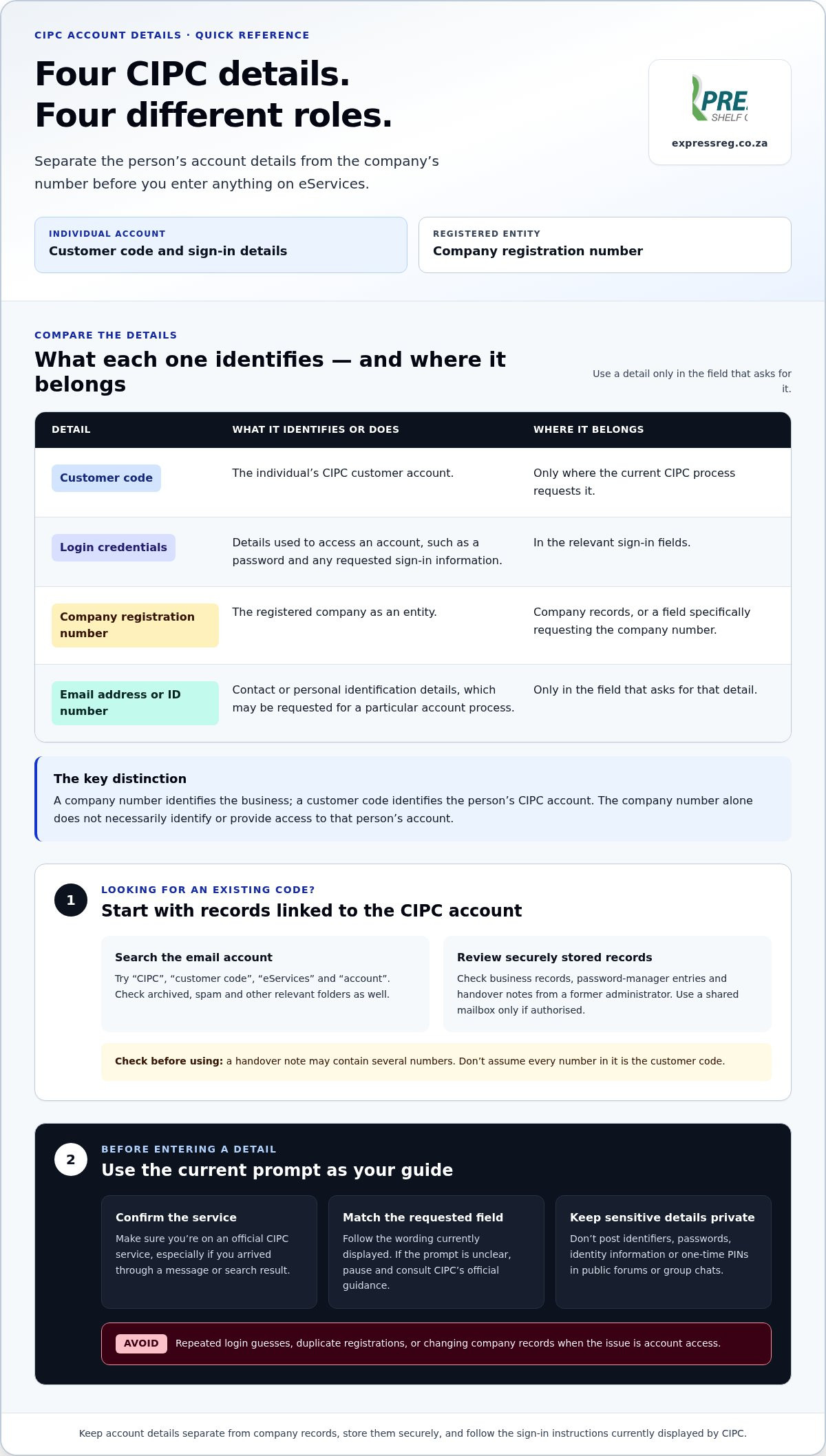
Use this comparison to sort out what you have before entering it:
| Detail | What it identifies or does | Where it belongs |
|---|---|---|
| Customer code | The individual’s CIPC customer account | Only where the current CIPC process requests it |
| Login credentials | Details used to access an account, such as a password and any requested sign-in information | In the relevant sign-in fields |
| Company registration number | The registered company as an entity | Company records or a field specifically requesting the company number |
| Email address or ID number | Contact or personal identification details, which may be requested for a particular account process | Only in the field that asks for that detail |
What a CIPC customer code is used for
CIPC’s current eServices information identifies the customer code as an account-related identifier for an individual transacting with CIPC. It is used in connection with access to eServices, but the precise information requested can depend on the screen or process. Enter it only when the official CIPC service asks for a customer code. Don’t assume its format, length or role in a recovery process based on an old note or an unrelated form.
A company number identifies the business; a customer code identifies the person’s CIPC account access. That is the key distinction: one points to an entity, while the other relates to an individual account. A company can have its own registration number, while an authorised person signs in using their account details. The company number alone doesn’t necessarily identify or provide access to that person’s account.
How it differs from company and personal details
A password is secret authentication information, not the customer code. An email address is a contact detail that may be linked to a profile, and a South African ID number identifies a person. Even when CIPC requests an ID number during an account process, don’t treat it as interchangeable with the customer code. Follow the exact field labels on the current CIPC page.
To identify what the sign-in page needs, read the label above each field and any accompanying instructions. If it asks for a customer code, don’t enter the company number just because it appears on a registration certificate. If it asks for a company registration number, don’t use a personal account identifier instead. Pause if the wording differs from the records you have, and refer to current official CIPC guidance before submitting personal information.
Once you’ve identified the right detail, keep it separate from company documents and passwords in your secure records. If your next task is a company compliance filing rather than account recovery, CIPC annual return filing support can help with that separate administrative requirement.
Can’t find your CIPC customer code? Follow a safe recovery sequence
If you’re still finding my CIPC customer code difficult, work through the recovery steps in order. CIPC’s online screens and instructions can change, so check the current guidance on the official CIPC website before acting. Confirm the address belongs to CIPC before entering your ID number, account details or other personal information. Don’t create a second account or change company records just to solve an access problem.
- Recheck your records. Search previous CIPC correspondence and securely stored account notes, including archived and spam folders. Check that you’re looking at a customer code rather than a company registration number, password or another identifier.
- Confirm the account details you can access. Identify which email address and cellphone number are linked to the account, if known. These contact details matter for password recovery because CIPC may use them to send a one-time PIN. Don’t guess repeatedly if you’re unsure.
- Follow the current CIPC self-service instructions. The recovery route depends on what you’ve forgotten. For a forgotten customer code, CIPC’s eServices guidance describes using the “Register” option and entering your ID number to check whether a customer code already exists for it. Read the current on-screen instructions before proceeding; don’t complete a new registration simply because you can’t remember the code.
- Escalate if the available options don’t resolve the issue. Use the support channel and contact details published on CIPC’s official website. Explain what you tried and what happened, without sending passwords or unnecessary personal documents through an unverified channel.
Use the current CIPC account-recovery options
For a password reset, the email address or cellphone number on the profile needs to be current so you can receive the required PIN. If those details are outdated, CIPC’s updated instructions require a customer update form and a certified copy of your ID, no older than three months, sent from the new email address to resetpassword@cipc.co.za. Check the latest CIPC instructions for the correct form and submission requirements before sending documents.
Keep a private note of the steps you’ve completed, such as the page visited and the message displayed. Don’t store passwords in an unsecured document or include them in your notes.
Escalate carefully if self-service recovery does not work
If the official recovery route still leaves you unable to sign in, contact CIPC using the support details currently published on its website. The CIPC call centre number provided in its current contact information is 086 100 2472; verify it on the official site before calling in case details have changed. Have relevant account or company references ready, but share only the information needed to explain the issue.
Record the date, the steps attempted and the exact error message. This gives you a clear account for follow-up and helps distinguish an account-access issue from a separate company filing or record change.
Before you try again: protect your CIPC account and avoid filing errors
Pause before making another attempt. Repeated guesses, registering again or changing company information can add confusion without fixing a sign-in issue. Entering the wrong identifier may stop you accessing a CIPC service, but that alone doesn’t mean the company’s status or records have changed. Keep the problem in the right category: account access first, company administration only when that is the task you intend to complete.
Avoid common customer-code recovery mistakes
Use the detail requested by the current CIPC screen. Don’t enter a company registration number as a customer code unless CIPC instructs you to do so. Avoid sharing passwords, ID documents, one-time PINs or account screenshots in public posts or informal group chats. Don’t submit director or other company-record changes solely to regain access. Those actions address different needs and may create avoidable work.
Be especially careful if an employee, bookkeeper or former administrator managed the account. Use a documented handover rather than relying on a password passed verbally or buried in old messages. Record who is responsible for the account, where authorised access details are securely held, and which business tasks are pending. When responsibilities change, arrange the handover privately and review internal access arrangements so the next administrator knows which account and records relate to the work.
When account access and a company filing overlap
A filing deadline and a login problem are separate matters. Don’t assume that a difficulty accessing eServices changes a due date or filing requirement. Check the current CIPC guidance for the specific filing, note any relevant deadline, and keep a record of the access issue and steps taken. If the company task is a director-record update, follow guidance for that process separately, such as this CIPC director changes guide.
If you’re trying to complete annual returns, keep that filing as a distinct task while you resolve account access. The CIPC annual returns guide can help you organise the filing steps; it doesn’t replace CIPC’s account-recovery process. Confirm current filing requirements through official CIPC information, particularly if a deadline is close.
Once you can sign in, return to the specific filing you intended to complete and check the on-screen instructions before submitting anything. For help with the separate annual return filing, get support with your CIPC annual return. Keeping account recovery and company changes separate makes it less likely you’ll take an unintended step while trying to get back into your account.
Once you find your CIPC customer code, take the right next step
Use the code only to continue through the CIPC service you intended to access. Check that you’re on the official service, follow the current field labels and confirm that you’ve reached the correct account area. There’s no need to repeat your customer code, password or other sensitive details in notes, screenshots or messages while explaining what you did.
After confirming access, store account information securely and keep it separate from general company documents. If an employee or administrator manages CIPC tasks, document who is responsible, where authorised account details are held and how access should be handed over. Share information privately and only with people who need it for their role. Express Shelf Company assists with CIPC administrative filings, including annual returns and director changes.
Match your next action to the task you need to complete
Signing in and filing are separate steps. If your task is an annual return, first make sure you can access the relevant CIPC service, then follow the current instructions for that filing. If you need to update director information, treat that as a separate company-record process and use the relevant CIPC director changes guide for procedural guidance.
Keep company information accurate and use current CIPC instructions before submitting a filing. If a filing is due, verify the applicable requirements and deadline through official CIPC information. Recovering account access does not itself complete a filing, and a filing requirement does not by itself resolve a sign-in problem. Keeping the two tasks distinct helps you focus on the next action without making unrelated account or company changes.
Get practical help with a separate CIPC filing
Once access is in place, you can continue with the filing you originally needed to complete. Express Shelf Company provides administrative support for CIPC filings, including annual returns and director changes.
If the outstanding task is an annual return, organise the company information needed for the filing and follow CIPC’s current submission instructions. For a director update or another compliance filing, keep the supporting company details accurate and work from the instructions for that process. This gives you a clear transition from account access to the separate administrative work.
Finding my CIPC customer code should help you get back to the right service, not lead to unnecessary changes. For assistance with a separate CIPC filing, explore CIPC filing support.
Keep your next CIPC task moving
Finding my CIPC customer code is a useful prompt to improve how your business manages access. Once you’re back in the right account, make account ownership and handover part of your routine: keep authorised details secure, document who manages them and note where the next administrator can find the handover record. That step can make a future change in staff or responsibilities easier to manage.
Then focus on the separate task that brought you to CIPC. If it’s an annual return, director change or another company filing, use the current CIPC instructions and make sure the company information you submit is accurate. Express Shelf Company assists with CIPC filings, including annual returns and director changes.
Explore CIPC filing support for help with your next administrative filing, and take the next step with a clearer plan.
Frequently Asked Questions
Where can I find my CIPC customer code?
Look in the email account and business records previously used to manage CIPC transactions. Search messages for terms such as “CIPC”, “customer code” and “eServices”, then check archived and spam folders. If you still can’t locate it, use CIPC’s current eServices guidance to check whether a code exists for your ID number. Don’t assume an old email subject line or a company document will contain the code.
Is my CIPC customer code the same as my company registration number?
No. A customer code relates to an individual’s CIPC account, while a company registration number identifies the registered company. For example, a person who manages filings may sign in using their account details and then work with a particular company’s records. If a form or portal field asks for one identifier, don’t substitute another unless CIPC’s instructions specifically direct you to do so.
Can I recover my CIPC customer code online?
You can check online whether a customer code already exists for your ID number. On CIPC eServices, follow the current instructions under “Register” and enter your ID number as directed. This check is not the same as resetting a password or creating a new account. If you’re actually locked out because you’ve forgotten your password, use CIPC’s current password-reset guidance and make sure you can access the registered contact details.
What should I do if my previous employee registered the CIPC account?
Ask the former employee for a formal handover of relevant account information and a list of pending CIPC tasks, using a secure channel. Establish which person’s account is involved and whether its registered email or cellphone number is still accessible. If you can’t obtain access or the profile details need updating, follow CIPC’s current customer-update process. Don’t continue using another person’s password without a clear, authorised handover.
Can I use my CIPC customer code to submit annual returns?
The customer code is an account-access detail, not an annual return form or proof that a return has been filed. You may need to sign in to the relevant CIPC service to work on the company’s return, then follow the current filing steps shown there. Keep the company’s information and any submission confirmation with its records. If you manage several entities, check the company selected before proceeding.
What happens if I cannot find my CIPC customer code before a filing deadline?
Not finding the code doesn’t by itself change a filing deadline, so check the current CIPC requirements for the specific return or filing and note its due date. Start the official recovery process and contact CIPC through the support details on its website if self-service doesn’t resolve access. Keep a record of your attempts. Don’t assume an account-access issue pauses a filing obligation or automatically grants extra time.